


T-P300BT
Personal handheld labeller
PERFECT FOR KEEPING THE HOME OR OFFICE IN ORDER
Being more efficient and better organised is easy with the PT-P300BT Bluetooth Labelling Machine, which delivers professional-looking laminated labels at the touch of a button.
From your files and equipment to your shelving units, this handheld label printer helps you to keep everything straight at home or in the office, while the lightweight design and soft touch keys means it’s especially simple to use.

Pros:Easy setup, Easy to use, Small, Wireless, Small footprint
Key Features
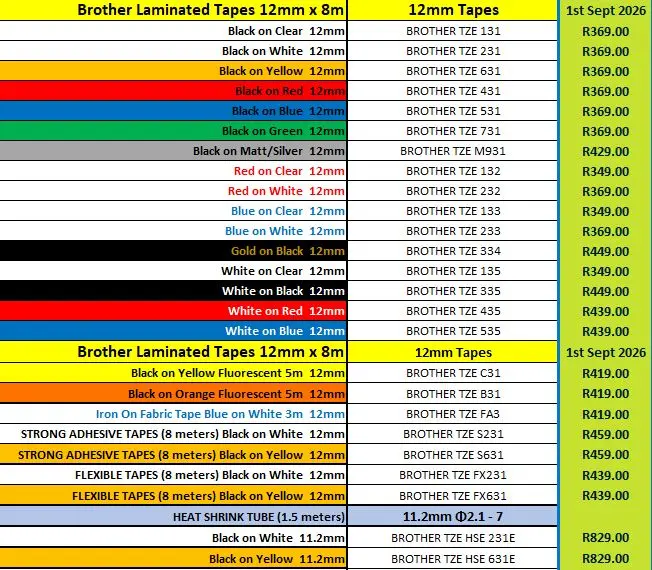
- Prints 6, 9, 12mm, TZe laminated labels
- Fast print speed of 20mm/sec
- Manual cutter
- 25-300mm label length
- Bluetooth connection via Design & print app.
- Max 2 line printing
- Sleek & stylish design fits perfectly into your interior
- Ships with 12mm Black on White tape (4m)

This score is based on all expert and user reviews that TestFreaks has collected for this product. Reviews and scores are collected from more than 30 countries but only reviews in selected languages are shown below
Brother
•
I bought this printer to use with my Apple iMac (M1 Apple Silicon) . I tried downloading the P-Touch Editor from the App Store but discovered that the printer is only compatible with MacOS 13 and above. My Mac runs Monterey and I have no intention of upgrading the OS just to use the P-touch.
Takealot
•
I’ve been using the Brother PT-P300BT label printer for both home and small office tasks, and it’s truly exceeded my expectations. The setup was effortless—just download the Brother Design&Print2 app, pair via Bluetooth, and you’re ready to go.
Takealot
•
This label printer is AWESOME. It can do everything you need to do INCLUDING QR codes, using the Brother apps. Also as a bonus, the apps run on an ancient iPad (from 2014) so there's still a use for your old iPad, to print labels.
Takealot
•
I bought it to label my cables, whether it be solar PV String Positives and Negatives or alarm cables and where they go. Makes everything look neat and professional, and if you want to, you can label other stuff just for the fun of it.I love the ease of labeling and often over due it but to me it...
Takealot
•
This is a magic device, very easy to use a makes great labels. The font type and size can be changed using the app, it can also print 2 lines (maybe more but I haven’t tried). As other reviewers have noted, there can be tape wastage, this can be mitigated by printing multiple labels at on time and...
Brother
•
Nice little device but wish it could accommodate wider tape widths. Easy to use from cell phone app.
Brother
•
This model prints a great thin label but can’t accommodate tape cartridges wider than ~1/2”. Nice font choice, layout options, etc. I just wish I had noticed the limitations before I made the purchase.
Takealot
•
great product, so easy to use and set up we love it
Brother
•
I have been using the cube for sometime and have no real problems with it. I love the ability to use it on battery only.
Brother
•
Compact, light weight, well made, easy to use label maker with many features to create pleasing innovative labels at a superb price point. The label tape cartridges are easy in-out, and produce quality labels that stand up to water spills, and curl issues where they might come off.
Brother
•
It’s a radical new vision! Switching from a self contained unit to a keyboard less solution is scary. It gives a bit of heartburn when you have to but tooth link to it. I wish it was just on my network.
Brother
•
I found the format choices limited and would opt for a more traditional keyboard style in the future.
PB Tech
•
Love the product. Good experience of using it
Takealot
•
Nice little label printer. It is compact, easy to use and Does just what I need it too…. It does waste a bit of tape though, even if you set it to only cut after printing a number of labels.
Takealot
•
Wow. Love this. Definitely recommended.
Takealot
•
Works well. Connects easily. Good quality and has lasted long. Cutting mechanism just wasted alot of tape
Takealot
•
Nice product. Just bad that it doesn't come with a changer. Brother Charger is very over priced. Batteries wil have to do for now
Takealot
•
Great little label printer. Doesn't come with an 12V external power cable. Uses 6 AAA batteries. There are 2 brother apps that can be used. P touch design&print 2 is more template base. iPrint&Label is more complicated but allow you to create barcodes and QR codes.
Takealot
•
software is easy to use. prints quickly. happy
Takealot
•
Great label printer, amazing variety of labels available.
