


Brother PT-D610BT Label Printer
Desktop Bluetooth and PC Connectable Label Printer with Colour LCD display
Organise, identify and personalise up to 24mm with the PT-D610BT

The Brother PT-D610BT Label Printer is ideal for clear and durable workplace labelling up to 24mm wide. It is perfect for organisation of workspaces, clear identification of equipment, assets and filing, as well as creation of basic instructional or warning notices.
The compact and sleek new design ensures that it fits at any office workstation. It has a multitude of great benefits that help make the workplace more efficient and eliminate those little irritations that have staff tearing their hair out.
Connect to your PC or Mac and be creative by using various fonts, text styles, images and frames on your label design. You can even link to text contained in a Microsoft Excel spreadsheet to quickly print many labels at once, thanks to its high-speed print capabilities.
This high specification label maker is the ideal partner in your office to help you and your colleagues stay organised.
Key Features
- USB connectivity - Bluetooth Connectivity
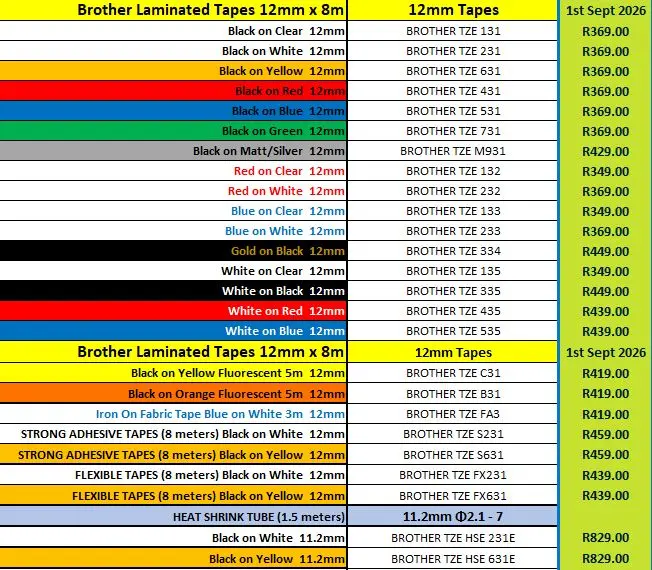
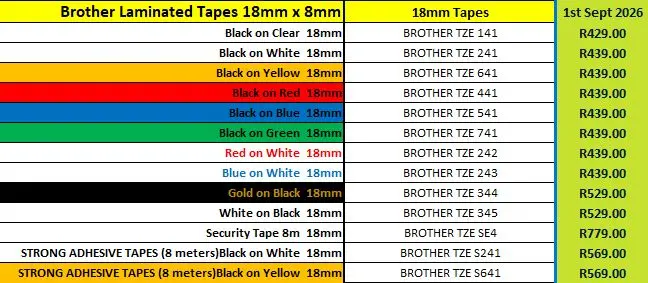
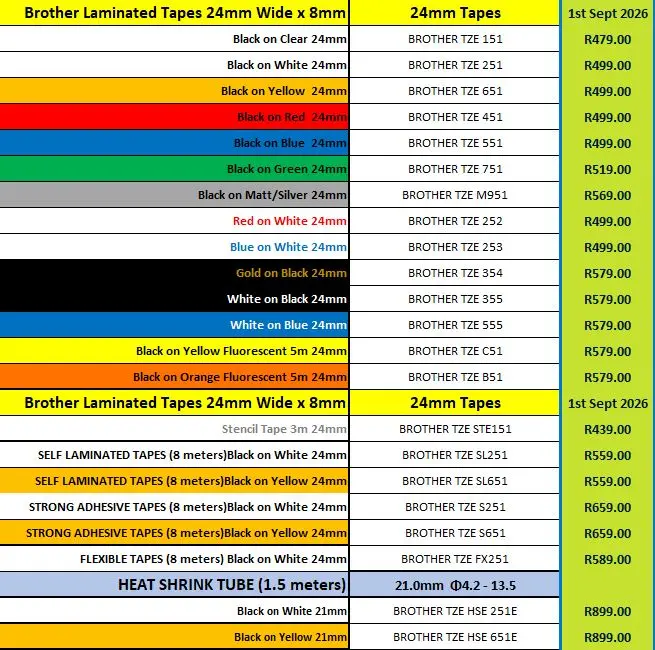
- Prints on 6mm – 24mm TZe laminated tapes
- 20 Character, 3 line Colour LCD display
- P-Touch Editor included
- Fast print speed of 30mm/sec
- 24mm Max print height
- 180 dpi Print resolution
- Automatic cutter
- 30mm – 300mm Label length
- 9 Barcodes supported
What’s in the Box?
The PT-D610BT Label Printer ships with the following:
- AC Adapter
- 12mm Black on white TZe laminated tape (4m)
- USB Cable
- Quick Set Up Guide


This score is based on all expert and user reviews that TestFreaks has collected for this product. Reviews and scores are collected from more than 30 countries but only reviews in selected languages are shown below.
Brother
•
Easy to operate, very happy with my purchase. Highly recommend.
Brother
•
Very handy printer for all your labeling needs, takes a multitude of size tapes, and surprisingly to me there are tapes that are cloth for labeling clothes. Bluetooth connectivity to phone not needing a computer for easier use and recording special labels
Brother
•
I have found that when something is easy to use, the results look generic and cheap. But that is not the case with the Brother P-Touch PT-D610BT! It is easy to use and the results look great and professional!
Brother
•
Easy to use. Plenty of features. Simple to connect to an iPhone. Can use different size labels and color of print. An awesome feature is can print two lines of text on larger labels. Using a phone I can even upload a picture and print it. Loaded with lots of symbols and characters.
Brother
•
I find the learning curve somewhat tedious. The printed User Guide needs someone with an English to degree because the format lacks cohesion.
Brother
•
I absolutely love this label printer. It is easy to use and self adjustable. I love how you can insert any label cartridge and the printer automatically adjusts to to correct size and function. I wish there was a master class on utilizing all of it's capabilities.
Brother
•
Excellent product with many features compared to older models, saving a lot of tape. The printing resolution is satisfactory, making it a good investment for upgrading from an older thermal printer.
Brother
•
Lots of features, all of them work. Connected software has decent editing program allowing for all kinds of decorative label creation.
Brother
•
Love this little printer. It's Bluetooth connectivity is key, and flexibility with several label tape sizes is necessary for us. We can even print shrink tube - a real bonus.
Brother
•
Great label machine only thing missing is half cut features to be best office unit.
Brother
•
A great upgrade over the more basic p-touch range. The wider label types and more customisation of content that you put on the label opens up a lot of options. The iOS app works adequately with USB connectivity to windows software working well.
Brother
•
Didn't meet expectations and couldn't satisfactorily load labels from a previous model. Gave it away.
Brother
•
The PT-D610BT is the third Brother P-Touch label printer I have purchased. The printers required replacement for no other reason that with newer versions of MacOs, Brother decided to stop supporting the older OS thus requiring throwing out the printer and purchasing new.
Brother
•
This is a really nice label maker and printer. It's easy to change cartridges and even will print on shrink tube. Using this for a few weeks now, I've made quite a few labels and shrink tubes. I took off one star, should have done two, but at least one is deserved.
Brother
•
about this product I love everything about this product and how versatile it is,however my only complaint is that I absolutely hate that this is only compatible with alkaline batteries which are one time use only which means they're disposable and that's not cheap if you use this device a lot like I...
Brother
•
I have spent multiple (>5 hours) trying to fix this problem. Bluetooth printer driver will not install or installs and then disappears. Brother and Norton agents have tried to fix to no avail. Asking for a replacement in case it's a hardware problem.
Brother
•
This is such a great product, you can do so much with it.
Brother
•
Very capable label printer. I like the interface with phone so you can see what your label looks like before printing. The cut feature to make the label the exact right size is great.
Brother Canada
•
Lots of trouble connecting with the app and printing via Bluetooth. Customer support
Brother
•
This is my 2nd unit. I love this machine. I upgraded to gain both the COLOR SCREEN and to get the WIRELESS BLUETOOTH connection to my computer so that I could be cord free.
From the start I had difficulty getting my Bluetooth to work.
Brother
•
Great label maker better than previous models, wish Brother had more templets one could download for free or have them in set for a field (Mechanics, Engineering) even if it cost a small fee. And I like what Brother has done with the P-touch editor 6.3.1.0 software much cleaner look then Version 5.
Brother
•
I have an old P-touch that was able to use TZe Tapes and could also use AV tapes to make paper address labels. This new machine has a pin inside that doesn't allow the use to AV tapes so you cannot make paper address labels.
Brother
•
Great little multi style label printer to have handy on your desk or work top space or take on the road.
Brother
•
Nice feel not to heavy Does Everything we need it to do including Barcodes. Best feature for us is the Bluetooth printing on the move and connection to the computer for device tags.
Staples
•
Fantastic
Brother
•
I am disappointed with the 1-inch cut the device makes every single label you make, unless you choose multiple labels to print at the same time. but you still get the initial 1-inch wasted cut. What i do like is the customizing of the labels themselves.
Staples
•
I am disappointed with the 1-inch cut the device makes every single label you make, unless you choose multiple labels to print at the same time. but you still get the initial 1-inch wasted cut. What i do like is the customizing of the labels themselves.
Staples
•
With a full 1" tape width capacity, color LCD which previews how the label willl appear, and auto tape cutting, this is the only Brother PT machine worth considering. The others fall short (I have had a few).
Brother
•
Has everything you'd need or want, Except for a backlit keyboard! If it had that this label maker would be top of the line. Which it pretty much is even without it. Thank you! @brother #brother
Staples
•
Has everything you'd need or want, Except for a backlit keyboard! If it had that this label maker would be top of the line. Which it pretty much is even without it. Thank you! @brother #brother
